
How to create a new journalist?
In your new media profile under Journalists click on + Add Journalist below in blue.

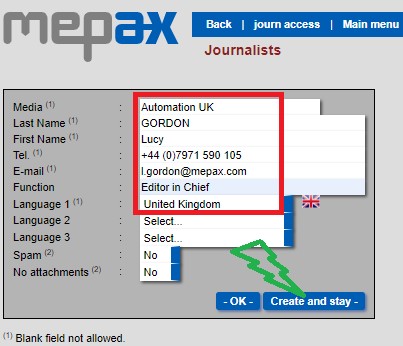
Next complete the form with journalist contact information then select create and stay as shown below in red and green.
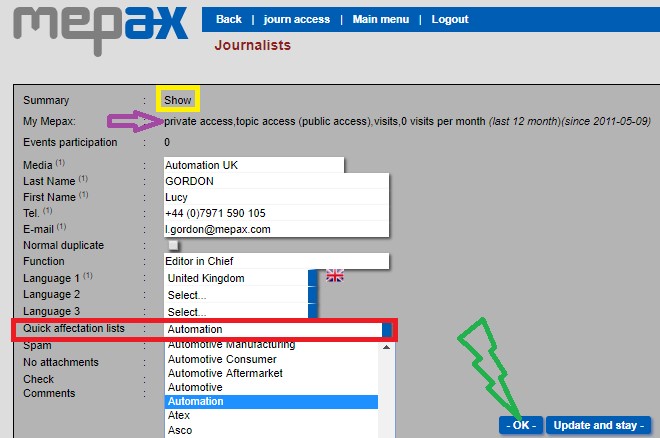
Now you need to assign a Quick affectation group, this the market of interest of your journalist for example automation as shown below in red. Then click OK below in green.
- IMPORTANT: if you do not know which Quick affectation group to choose, you must ask Fadi: f.ghadban@mepax.com
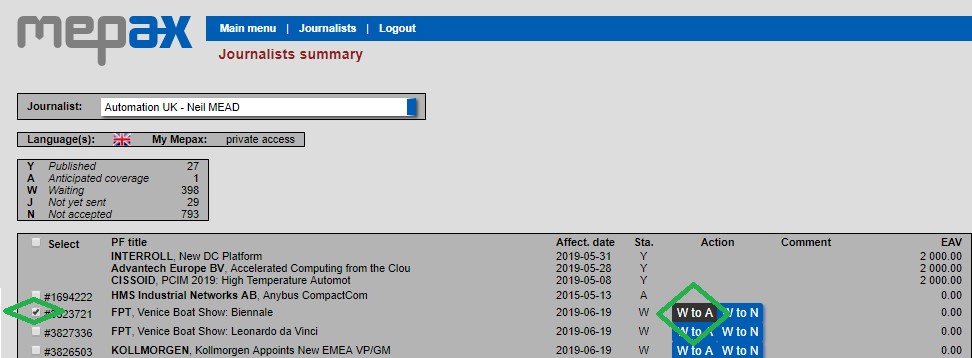
In the journalist profile if you click on Show above in yellow, you can see all the press releases this journalist has received. Here you can change the status from W to A or W to N as shown below in green. Please note that this change will be automatically applied to the Affected Journalists of your corresponding press release.
In the media profile, under journalists you can see in green the date the journalist last logged in. You can also enter the journalist private access, by clicking on access as shown below in purple. This allows you to view the list of all the PRs that have been sent to him or her.
