How to use “Customized email” to immediately send a PR?
How to proceed?
- Please select the press file and go to affected journalist.
- Click on Choose a task and by scrolling in the drop-down box select affect journalist several using group, to prepare your sending.
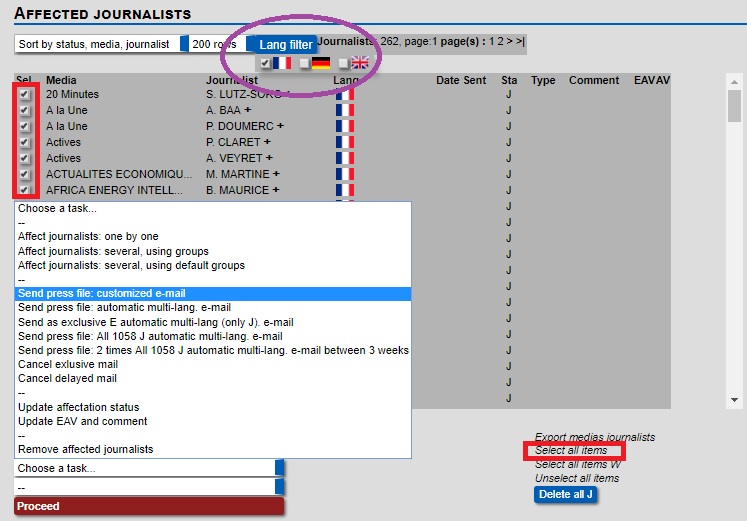
- Then when you have created the media list, you have to select the country by using lang filter below in purple.
- Then by selecting all items in "red right" your media list will be selected as displayed below in "red left".
- Now instead of selecting the normal sending you have to select “Send press file: customized e-mail” below in blue, choose your country and click on proceed.
- At this step, you can select the attached file you want to send to these media.
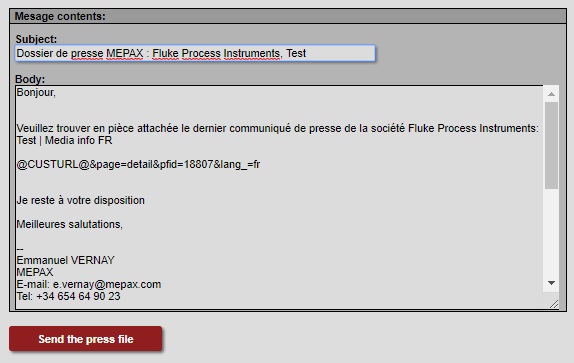
- You have the possibility to change the text in the Subject and body of the email.
- Finally click on Send the press file and it will go out immediately.