
Business Unit creation
To create a new business unit, please go to Main Menu under administration tasks and click on Customers (BU).
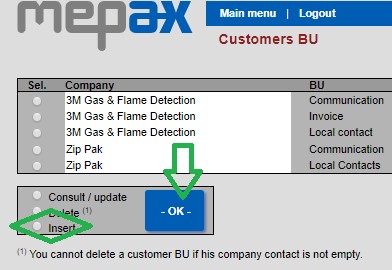
- In customers BU, at the bottom of the page, select Insert then click OK as shown below in green.
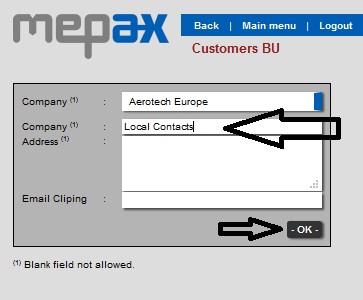
- By scrolling in the drop-down box select your customer, and in the company field please put Local Contacts or Invoice contacts, then click OK, as displayed below in black:
- Now your new BU is created, and you are able to create Local contacts for all the languages you may need in the future.

To create all your new local contacts (also for invoice contacts) please follow the same process we have previously seen in the Customer communication contact creation and make sure to select the appropriate BU in the second field (BU) in the customers contacts form.